- Haskell 100%
| app | ||
| resources | ||
| src/Rextra | ||
| test | ||
| .gitignore | ||
| automata.txt | ||
| LICENSE | ||
| package.yaml | ||
| README.md | ||
| Setup.hs | ||
| stack.yaml | ||
| stack.yaml.lock | ||
| todo.txt | ||

rextra
At the moment, rextra can display DFAs and NFAs using Graphviz, convert between NFAs and DFAs, and minimize DFAs.
The representation of DFAs and NFAs assumes an infinite alphabet:
-
DFA states always contain a default transition (marked with
*in the visualisations), which is taken if the current token doesn't appear in any of the other transitions. -
NFA transitions either apply to a set of tokens, or to all tokens except a specified set. In the visualisation, the character
Σdenotes the alphabet of tokens.
Example NFA-to-DFA conversion
This example ghci session converts the NFA shown on the wikipedia article about the powerset construction into a DFA, using the aforementioned powerset construction.
>>> Just a = nfa [ (1,[(only "0",2)],[3]), (2,[(only "1",2),(only "1",4)],[]), (3,[(only "0",4)],[2]), (4,[(only "0",3)],[]) ] (1::Int) [3,4]
>>> saveDotAsPng "nfa.png" $ nfaToDot a
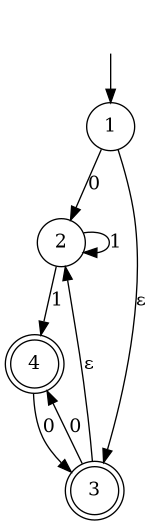
>>> saveDotAsPng "dfa.png" $ dfaToDotWithTokens "01" $ nfaToDfa a

Example DFA minimization
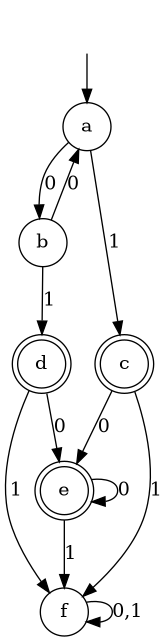
This example ghci session minimizes the DFA shown on the wikipedia article about DFA minimization.
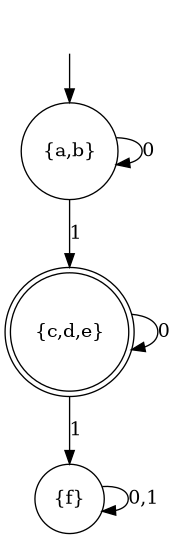
>>> Just a = dfa [ ("a",[('1',"c")],"b"), ("b",[('1',"d")],"a"), ("c",[('1',"f")],"e"), ("d",[('1',"f")],"e"), ("e",[('1',"f")],"e"), ("f",[],"f") ] "a" ["c","d","e"]
>>> saveDotAsPng "dfa.png" $ dfaToDotWithTokens "01" a
>>> saveDotAsPng "dfa_minimized.png" $ dfaToDotWithTokens "01" $ minimizeDfa a