2 KiB
rextra
At the moment, rextra can display DFAs and NFAs using Graphviz, convert between NFAs and DFAs, and minimize DFAs.
The representation of DFAs and NFAs assumes an infinite alphabet:
-
DFA states always contain a default transition (marked with
*in the visualisations), which is taken if the current token doesn't appear in any of the other transitions. -
NFA transitions either apply to a set of tokens, or to all tokens except a specified set. In the visualisation, the character
Σdenotes the alphabet of tokens.
Example NFA-to-DFA conversion
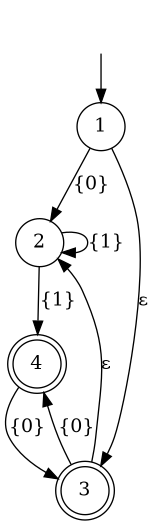
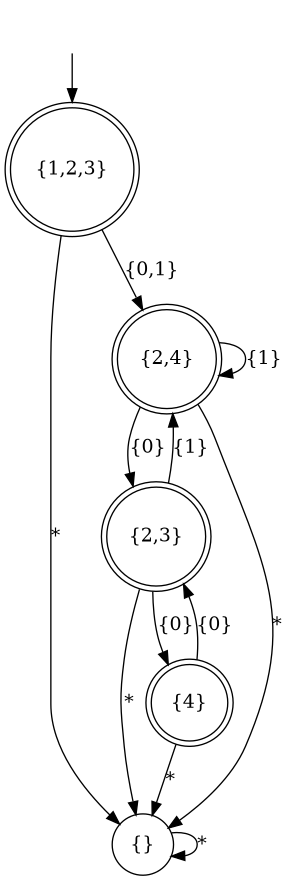
This example ghci session converts the NFA shown on the wikipedia article about the powerset construction into a DFA, using the aforementioned powerset construction.
The conversion assumes that tokens other than 0 and 1 may appear
in the input. Because of this, the resulting DFA looks different from
the one on wikipedia.
>>> Just a = nfa [ (1,[(only "0",2)],[3]), (2,[(only "1",2),(only "1",4)],[]), (3,[(only "0",4)],[2]), (4,[(only "0",3)],[]) ] (1::Int) [3,4]
>>> saveDotAsPng "nfa.png" $ nfaToDot a
>>> saveDotAsPng "dfa.png" $ dfaToDot $ nfaToDfa a
Example DFA minimization
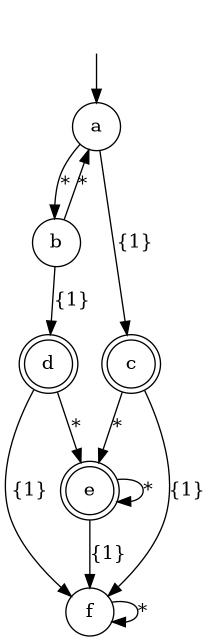
This example ghci session minimizes the DFA shown on the wikipedia article about DFA minimization.
Transitions for the token 1 are specified explicitly (where
necessary), while transitions for the token 0 are represented by the
default transition marked with *.
>>> Just a = dfa [ ("a",[('1',"c")],"b"), ("b",[('1',"d")],"a"), ("c",[('1',"f")],"e"), ("d",[('1',"f")],"e"), ("e",[('1',"f")],"e"), ("f",[],"f") ] "a" ["c","d","e"]
>>> saveDotAsPng "dfa.png" $ dfaToDot a
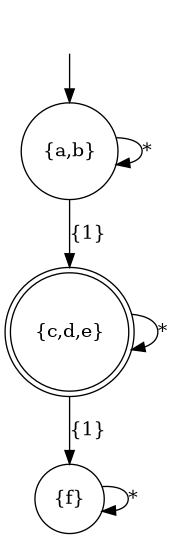
>>> saveDotAsPng "dfa_minimized.png" $ dfaToDot $ minimizeDfa a